
Author
Nahid Komol
Published
10 November, 2025
Human Written
Starting an online store used to be a complicated process that required technical skills, large budgets, and months of planning.
Today, that's no longer the case. Whether you're launching a side business, selling digital products, or turning a hobby into income, it's easier than ever to get your store online.
The challenge is knowing where to begin. Do you need a niche? Which platform should you choose? How do you make sure your store is ready for real customers?
This guide will show you how to create an online store step by step. We will cover everything from finding the right niche to launching and promoting your business. The steps work for any platform, but we will highlight how you can set up your store with ZOYEQ, our SaaS eCommerce solution built for today's needs.
Let's get started.
Define your niche and business model
Before you start designing your store or adding products, it's important to decide what you'll sell and how you'll sell it. This step sets the foundation for everything that follows.
Choose a profitable niche
A niche is the specific market your store focuses on. In 2025, some of the fastest-growing niches include:
- AI-generated products like digital art, templates, and tools.
- Eco-friendly goods such as reusable items, sustainable clothing, or biodegradable packaging.
- Health and wellness products, including supplements, home fitness equipment, and mental health resources.
- Hobby and lifestyle products for remote work, gaming, or creative pursuits.
When selecting a niche, think about three things: your personal interest, current demand, and long-term growth potential. A business you're passionate about is easier to sustain, but it should also have proven demand.
Pick a business model that matches your goals
Once you know your niche, you need to decide how your store will operate. Here are the most common models:
- Dropshipping: You sell products from a supplier, and they ship orders directly to your customers. You don't hold inventory, but profit margins can be lower.
- Print-on-demand: You sell custom-designed products like shirts, mugs, or posters. Items are only printed and shipped when someone places an order.
- Private labeling: You sell products under your own brand, often sourced from manufacturers. This gives you more control over quality and pricing, but usually requires a bigger upfront investment.
- Digital products or services: You sell items like ebooks, courses, templates, or software. There's no shipping involved, and you can sell the same product repeatedly without restocking.
Research your niche before starting. Use tools like Exploding Topics and Google Trends to spot demand and trends. Check how many stores already sell similar products, study competitor sites, reviews, and pricing.
By the end, you should know what you'll sell, who your target audience is, and the model you'll use.
Register your business and domain name
Once you know your niche and business model, the next step is to make it official. This makes your store look professional and ensures you can operate without legal issues.
Choose a business name
Your business name should be easy to remember, easy to spell, and ideally related to what you're selling. Try to avoid names that are too long or hard to pronounce. If you're not sure where to start, name generator tools like Namelix or Shopify's Business Name Generator can help you come up with ideas.
Once you've chosen a name, check that the domain name is available and that no other businesses are already using it.
Registering a domain name
After choosing a name, secure a matching domain. A .com is still the most trusted option, but in 2025, extensions like .store, .shop, and .ai are also popular. The key is to keep it simple and aligned with your brand.
You can buy domains from registrars like Namecheap or GoDaddy .
Legal requirements
Depending on your country, you may need to register your business as a sole proprietorship, LLC, or another structure. Each option has different tax and liability rules, so it's a good idea to check local regulations or get advice if you're unsure.
Business license
In some cases, you'll also need a business license or permit, especially if you plan to sell physical goods. Check with your local authority to see what applies.
Choose your online store platform (self-hosted vs SaaS)
Now that you have your business registered and your domain name ready, the next step is to choose how you'll build and run your online store. There are two main types of platforms to consider: hosted platforms and self-hosted platforms.
SaaS platforms
SaaS (Software as a Service) platforms handle hosting, updates, and security for you. Popular options include Shopify, Wix, and ZOYEQ. These platforms are user-friendly and save you from managing technical details, but they often have monthly fees and less flexibility for customization.
Self-hosted (WordPress + Plugins)
With a self-hosted option like Wix WordPress + Wix WooCommerce + page builder, you rent hosting, install WordPress, and manage your own plugins and themes. It gives you more control and flexibility, but you're also responsible for updates, backups, and security.
Which Should You Choose?
- If you want simplicity and don't mind paying a monthly fee, → SaaS (Shopify, Wix, ZOYEQ SaaS version).
- If you want maximum control, flexibility, and long-term scalability → WordPress with WooCommerce.
Set Up Your eCommerce Plugin (Using ZOYEQ)
With your domain ready, it's time to set up your store. ZOYEQ makes this process simple with a guided onboarding system. In just a few clicks, you can create an eCommerce store with your products, branding, and payment methods ready.
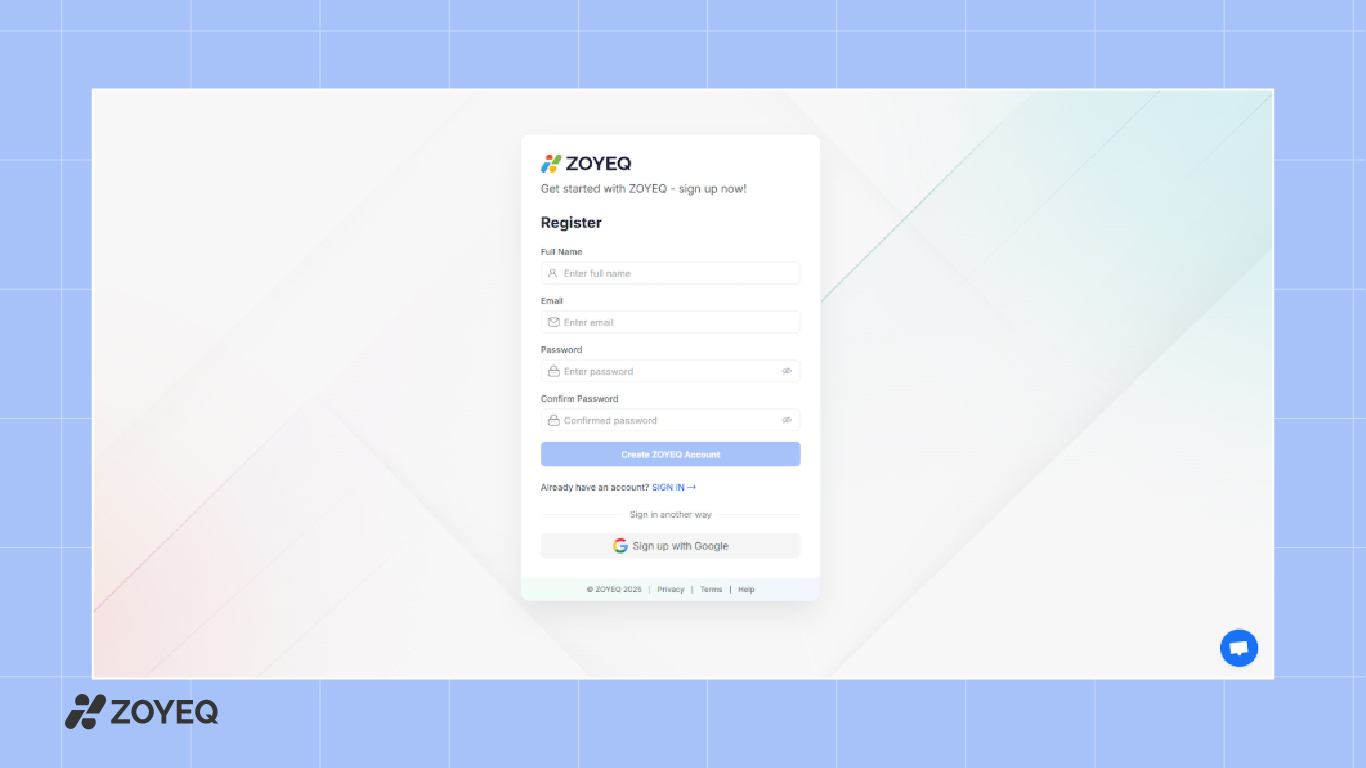
1. Create a ZOYEQ Account
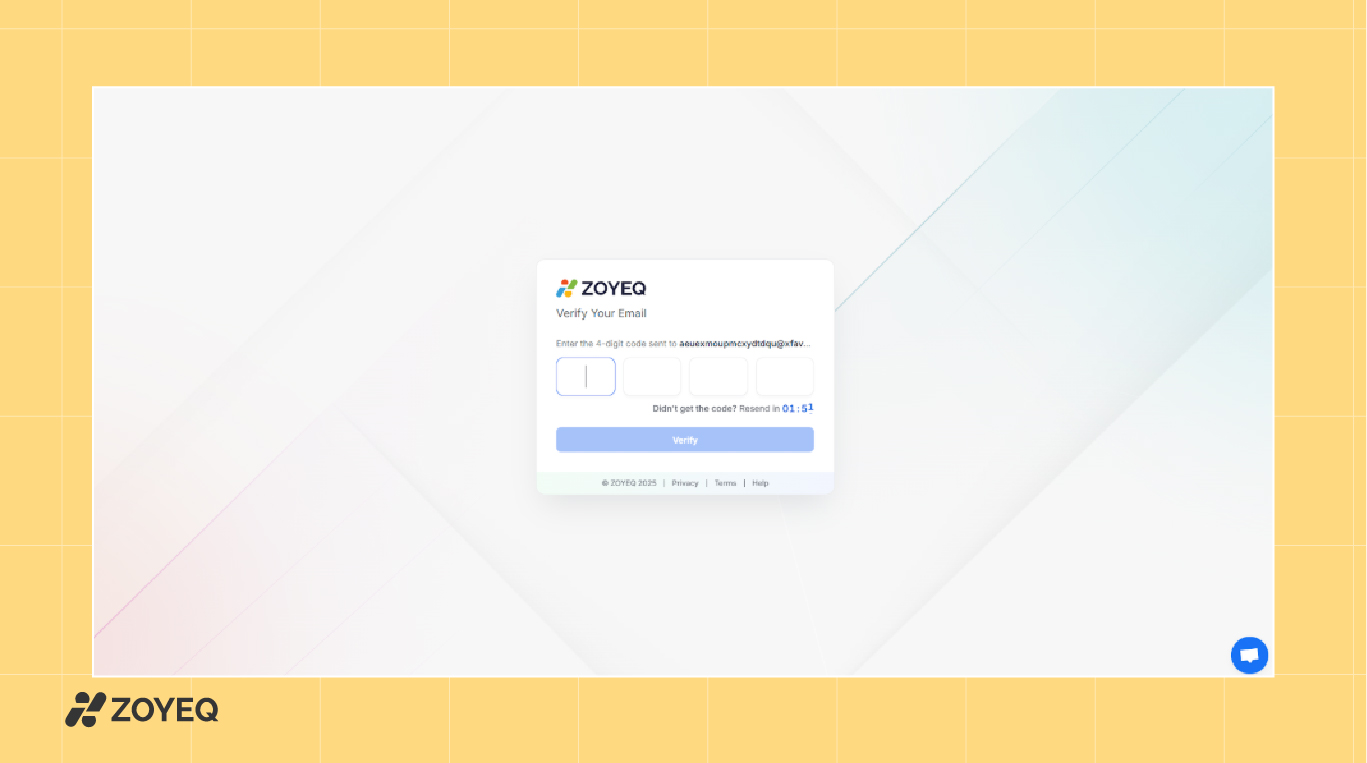
Visit zoyeq.com and sign up for a free account. You can register using your email or sign up directly with Google. Once your account is created, you'll be asked to verify your email with a short 4-digit code.
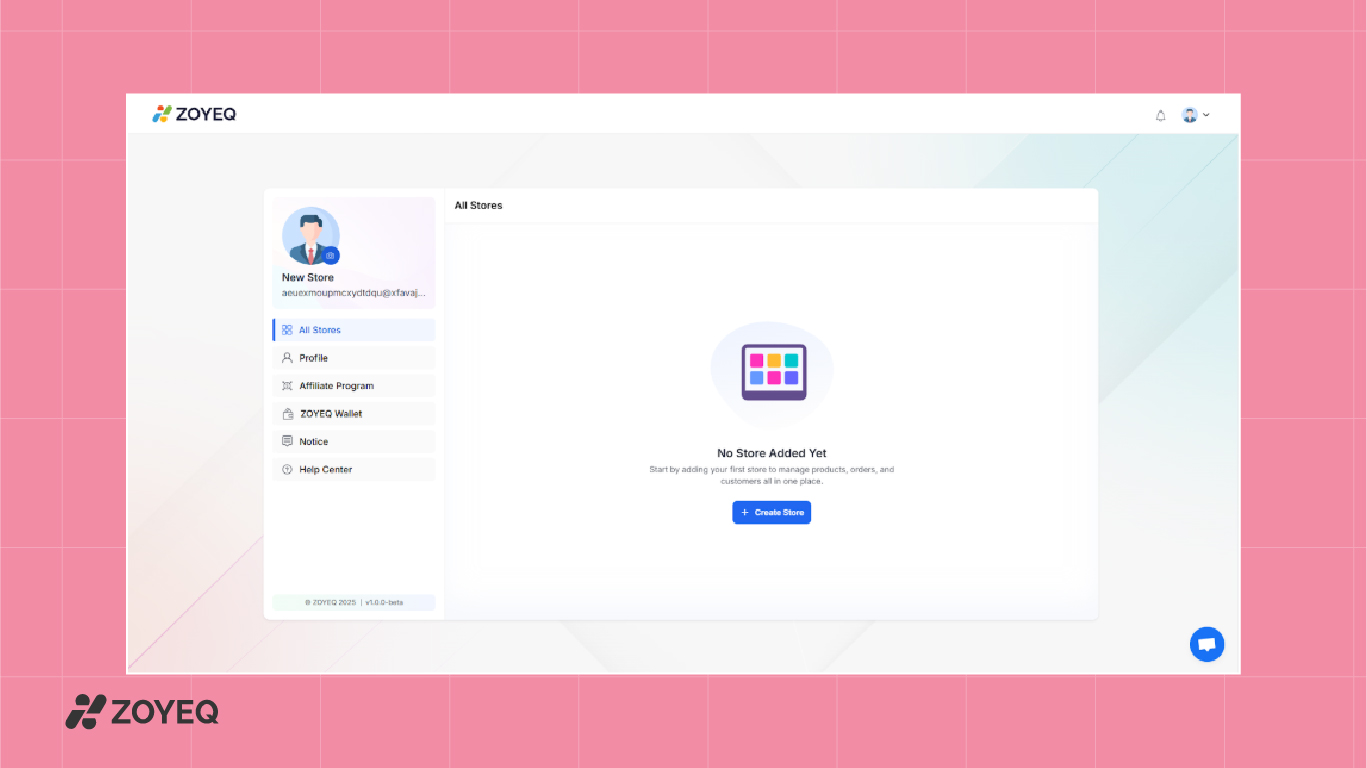
After verification, you'll be automatically redirected to your ZOYEQ dashboard.
2. Start the Onboarding Process
Click on the Create Store button. ZOYEQ will guide you through a simple 3-step onboarding flow:
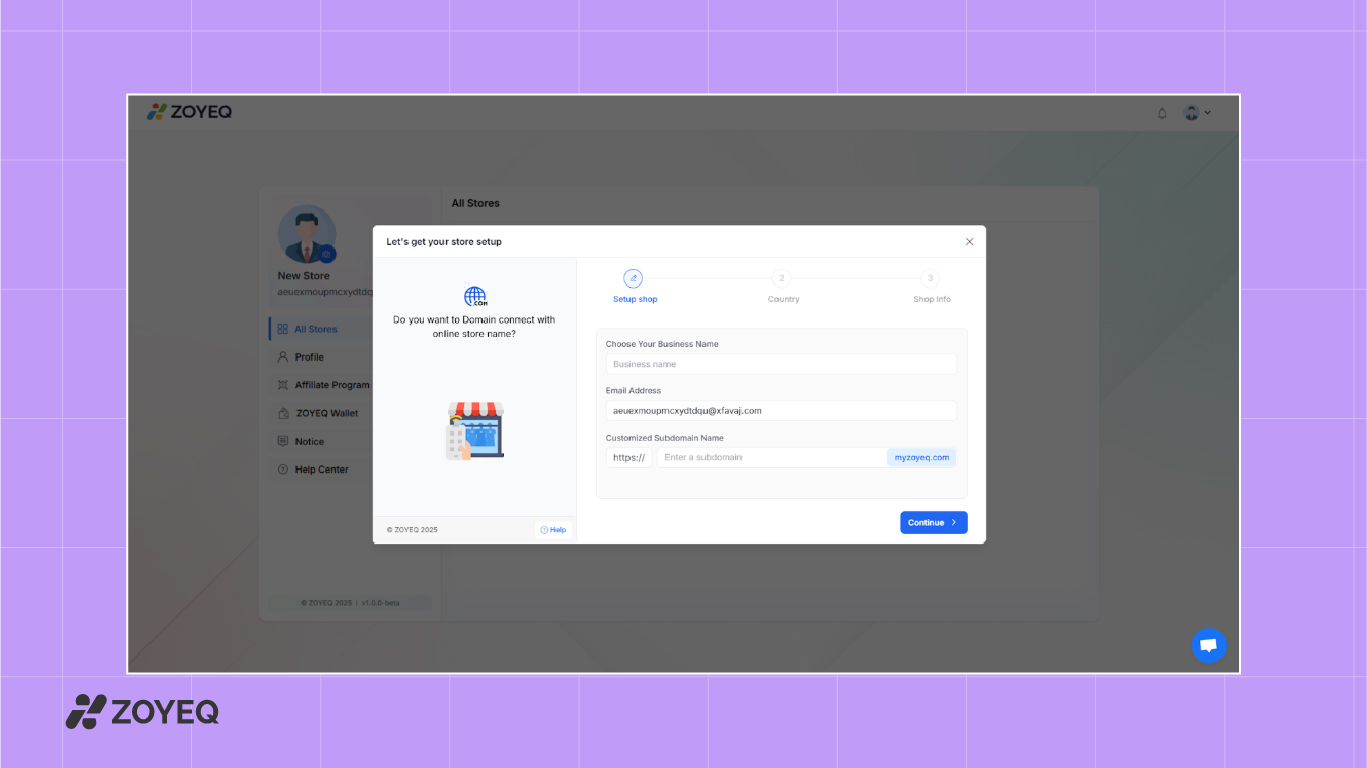
Step 1: Set up Shop
Enter your business name, email address, and customize your store's subdomain (e.g., yourbrand.myzoyeq.com). You can also connect your own custom domain later if needed.
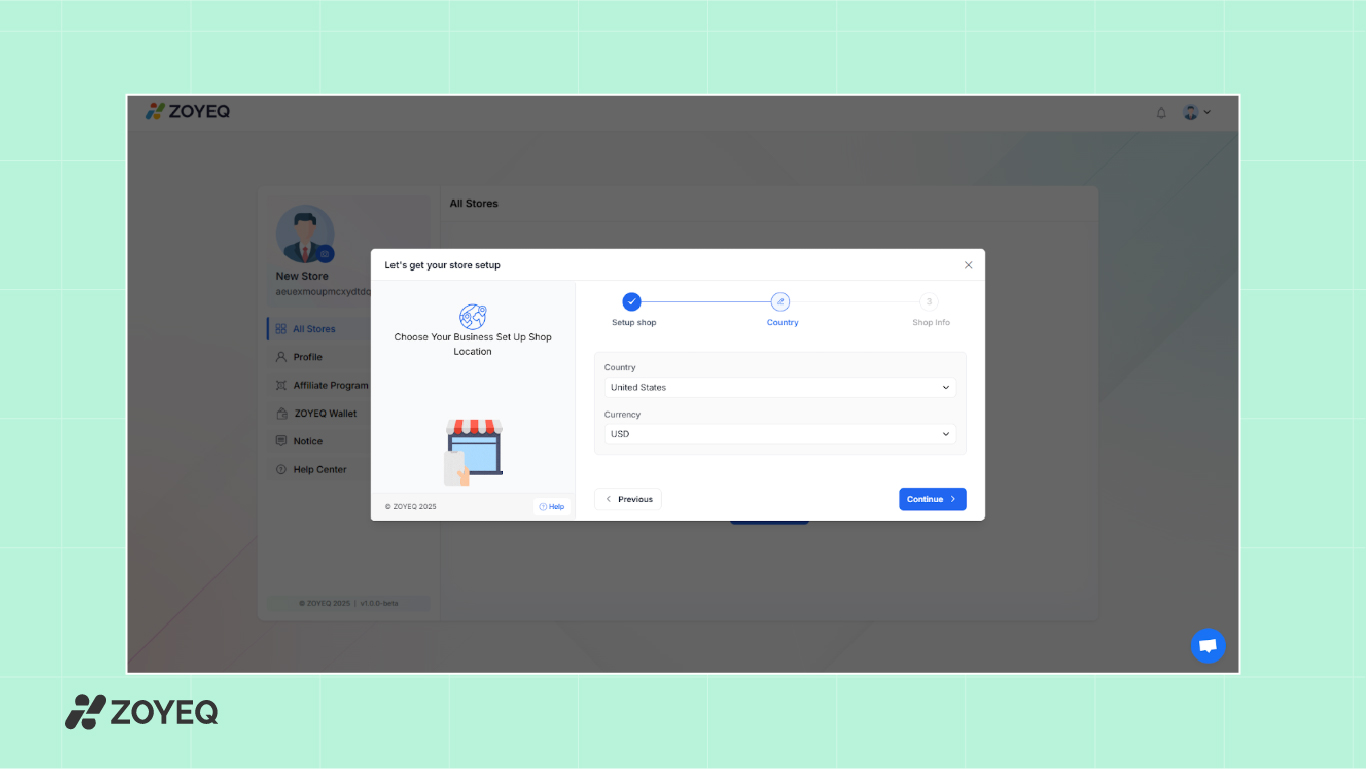
Step 2: Select Country and Currency
Choose your business location and preferred currency. This sets the default currency for your store and configures regional settings.
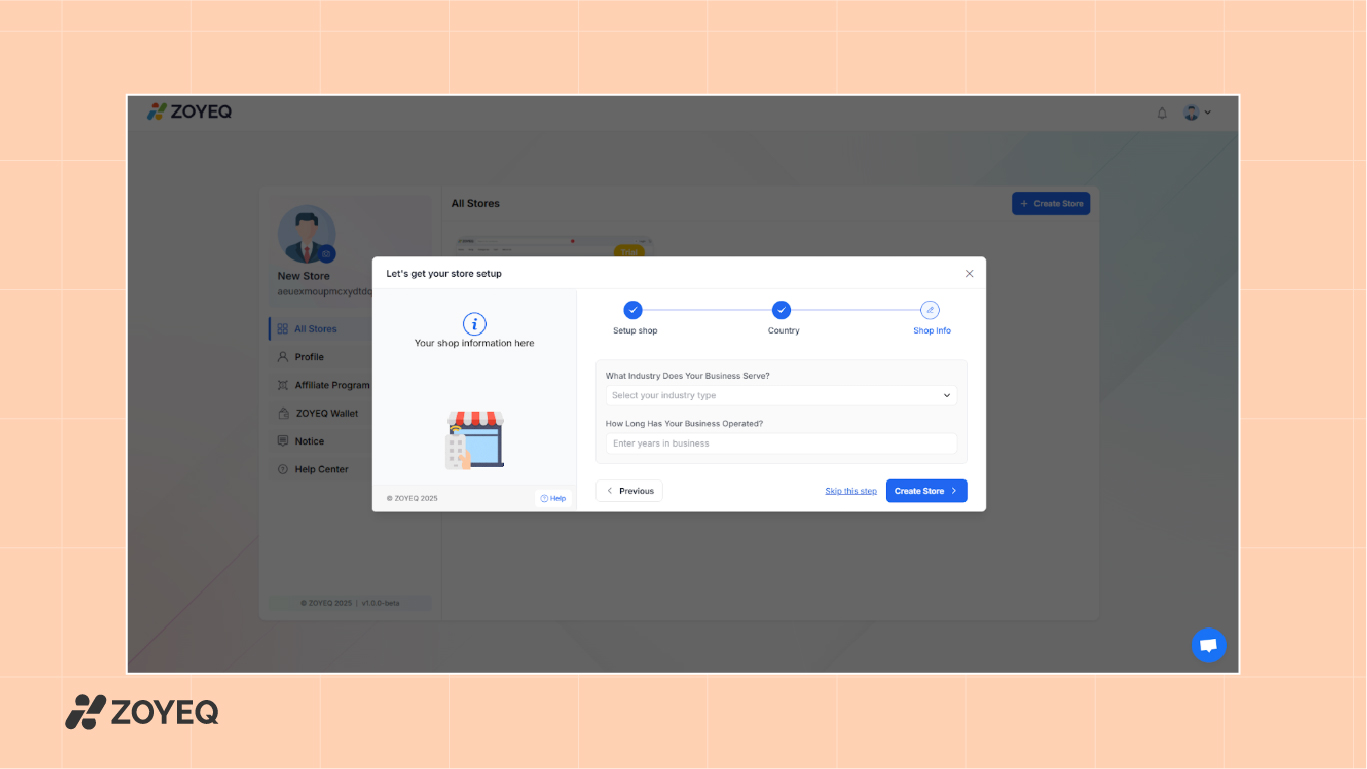
Step 3: Add Shop Info
Pick the industry your store serves (such as Fashion & Apparel, Electronics, or Digital Products) and indicate how long your business has been running. This helps ZOYEQ personalize your store setup.
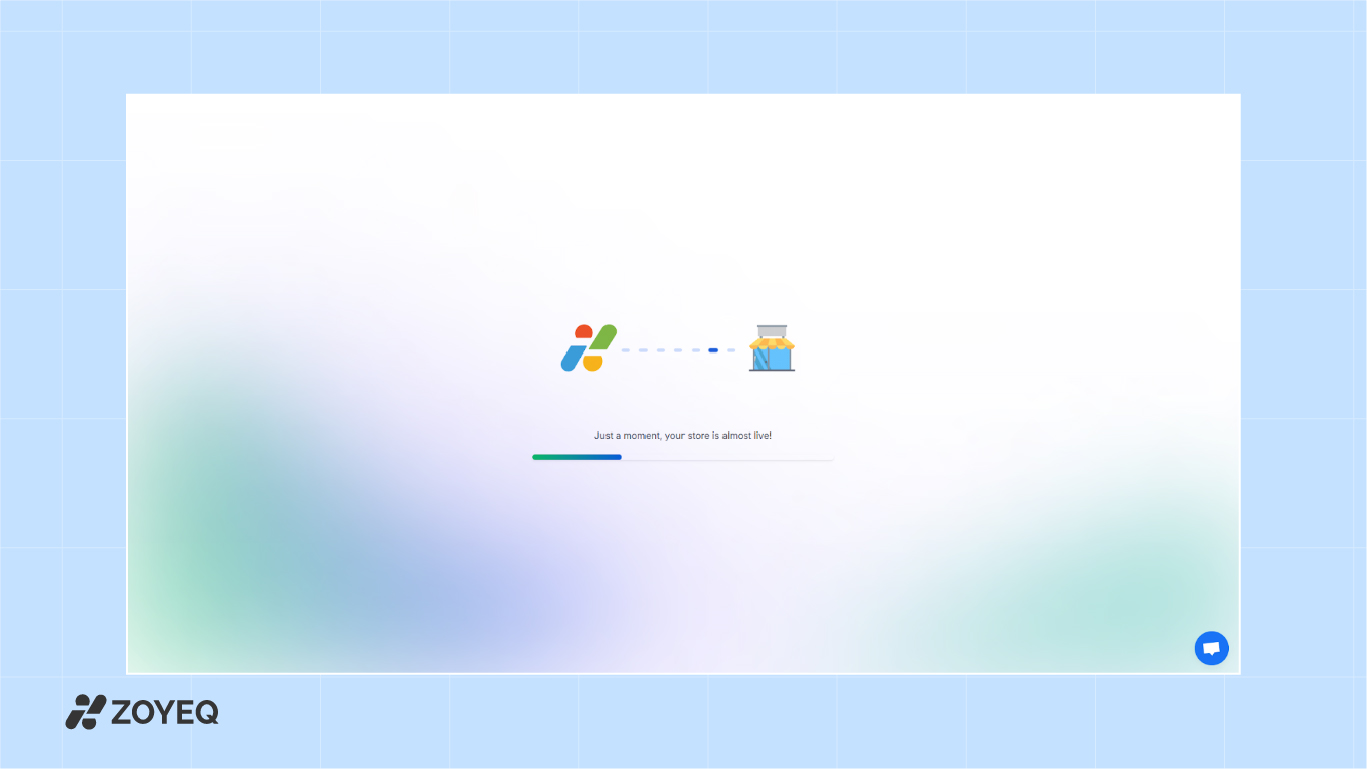
3. Launch your store
Once you've filled in the information, click Create Store. ZOYEQ will process your setup and get your online store live in minutes.
Create your online store
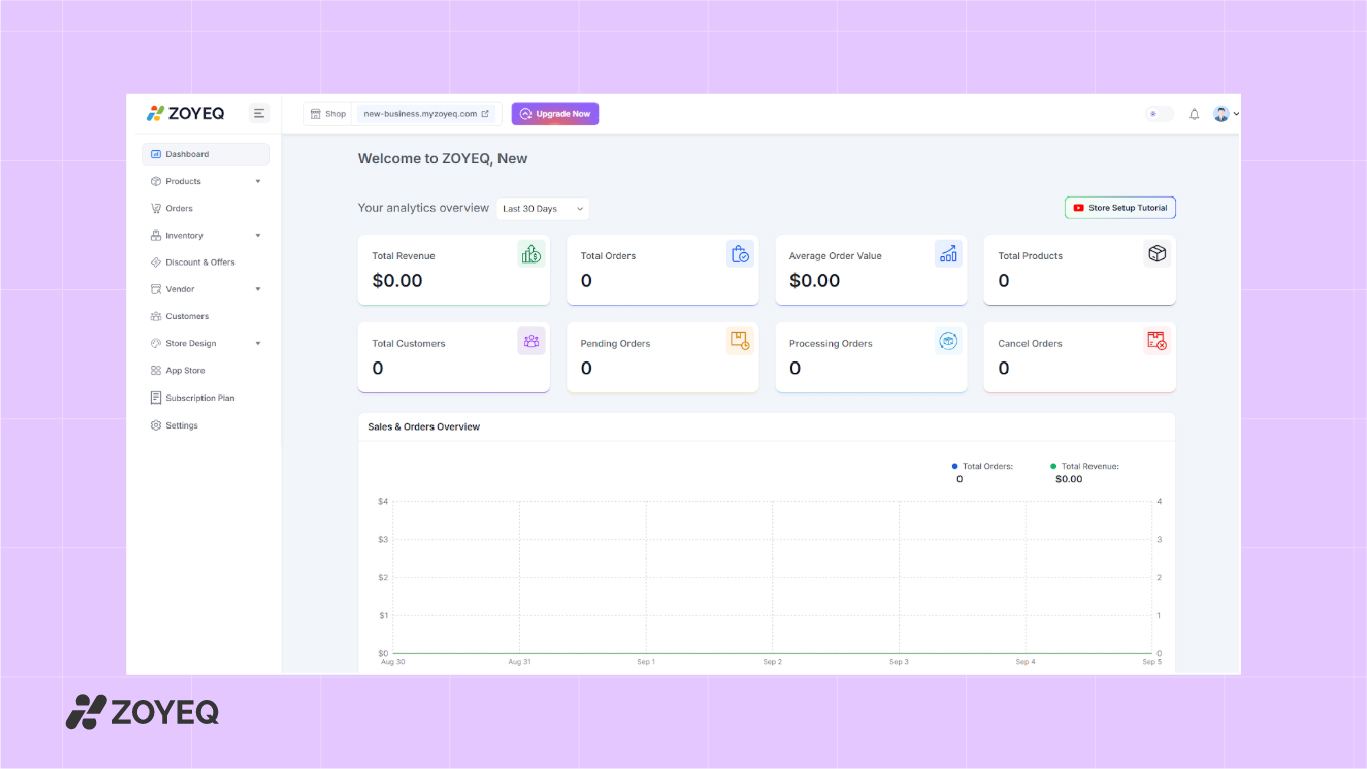
Once your ZOYEQ store is set up, the next step is to build it out. This includes adding your products, creating important pages, organizing your layout, and setting up your store design.
ZOYEQ gives you a clean and simple dashboard where you can manage everything in one place.
Add your first products
Start by adding products to your catalog. Go to Products > Product List > Add New Product.
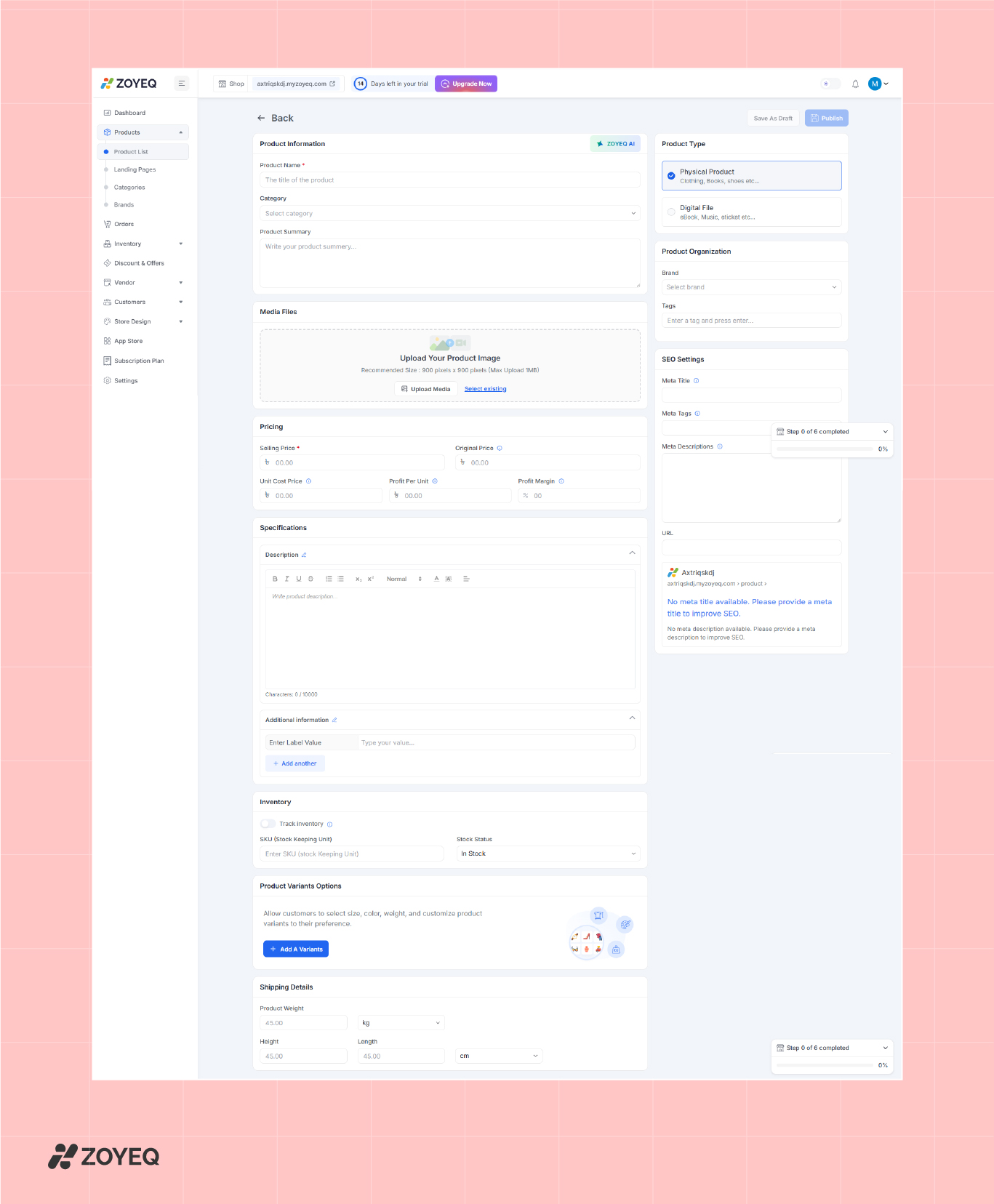
- Name and description – write in clear, simple language that tells buyers what they're getting.
- Product photos – upload clean, high-quality images. Good visuals can make or break a sale.
- Price and cost details – include selling price, cost, and profit margin to track earnings.
- Variants – add options like size, color, or material.
- SEO settings – fill in meta titles and descriptions so your product pages rank on search engines.
ZOYEQ makes this process simple with built-in fields for all details, including inventory tracking and shipping weight. You can also select whether it's a physical product or a digital file (like an ebook or download). ZOYEQ allows you to manage variants (like size or color) and even add profit margin tracking.
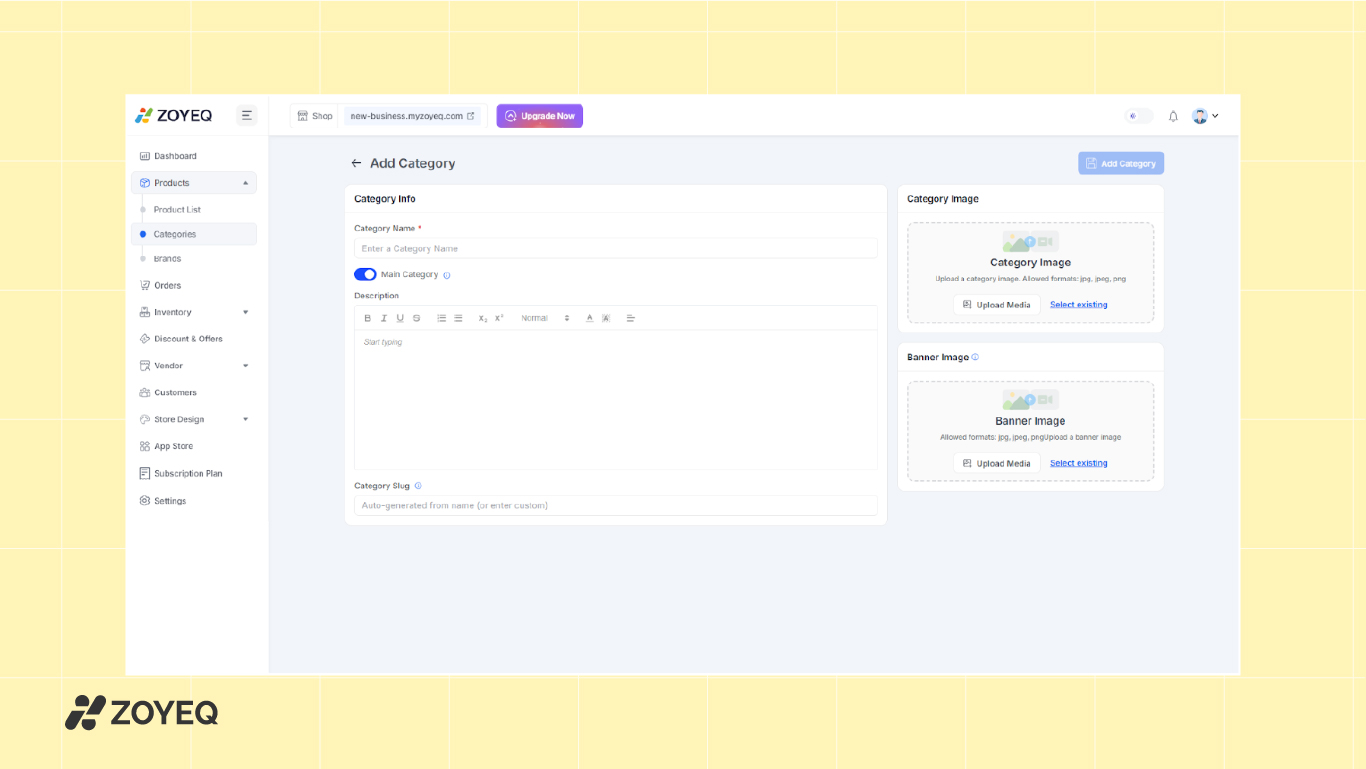
If you're offering different brands or categories, you can set those up in the Products > Categories and Brands sections.
Manage Inventory and Warehouses
ZOYEQ makes inventory management easy. Head to Inventory > Warehouse to add warehouse details like name, contact info, and location.
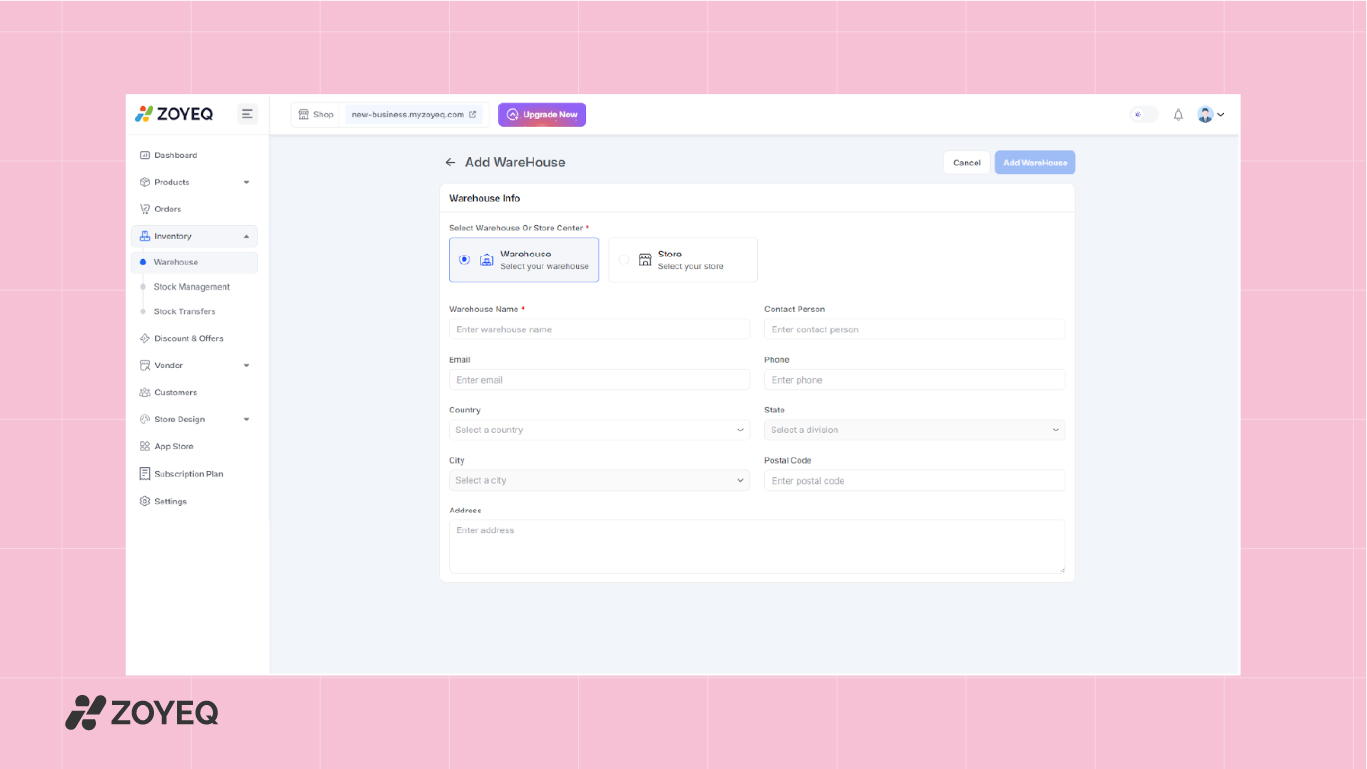
You can manage stock levels and track transfers between locations. This is useful if you ship from multiple regions or handle your own fulfillment.
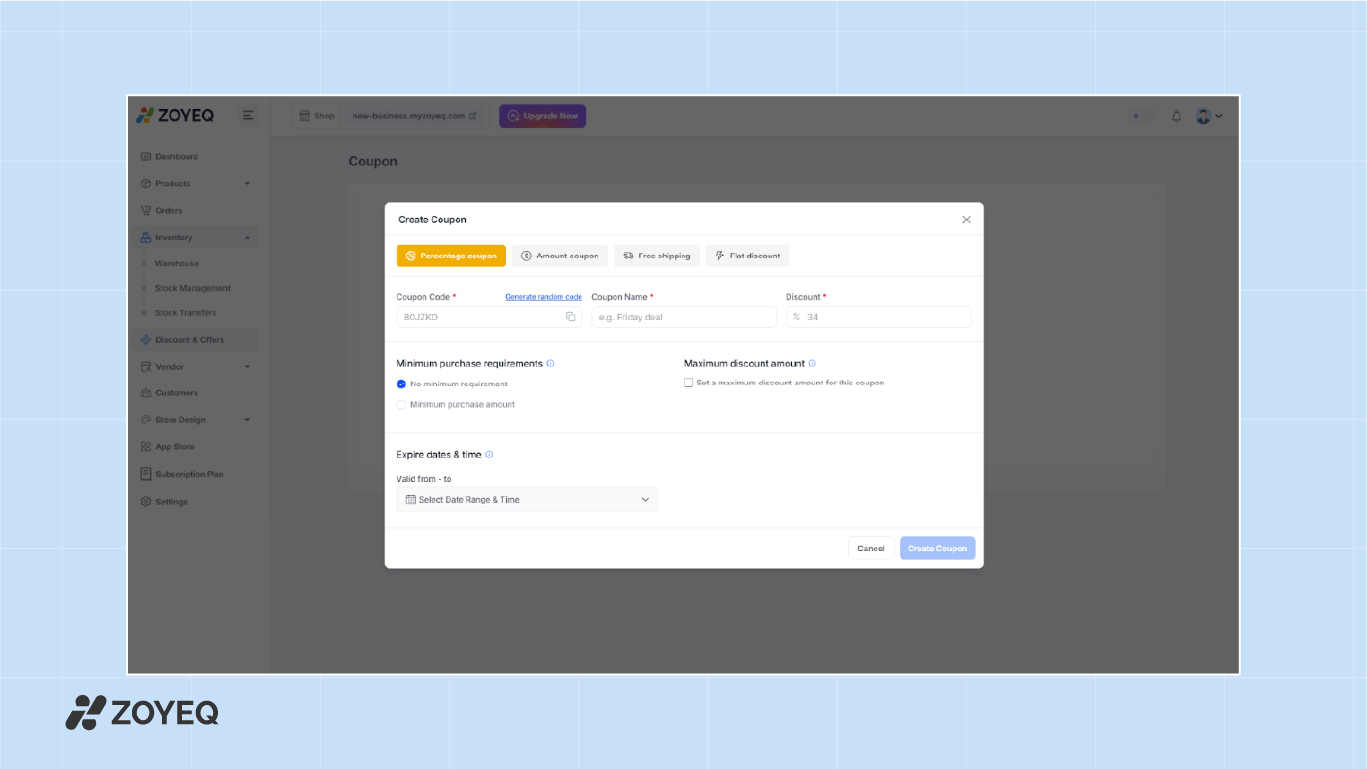
If you're running discounts, use the Discount & Offers section to create coupons, set conditions, and define expiration dates.
Store design
This is where your store gets its personality. Under Store Design, you can create an online shop website that matches your brand with custom themes and pages. Here, you'll find three main areas:
Themes
ZOYEQ's design system is structured but flexible. Go to Store Design > Themes to choose a eCommerce website layout that fits your brand. Each theme is optimized for mobile and comes with a ZOYEQ Commerce, All Mart, or Tech Store modern layout.
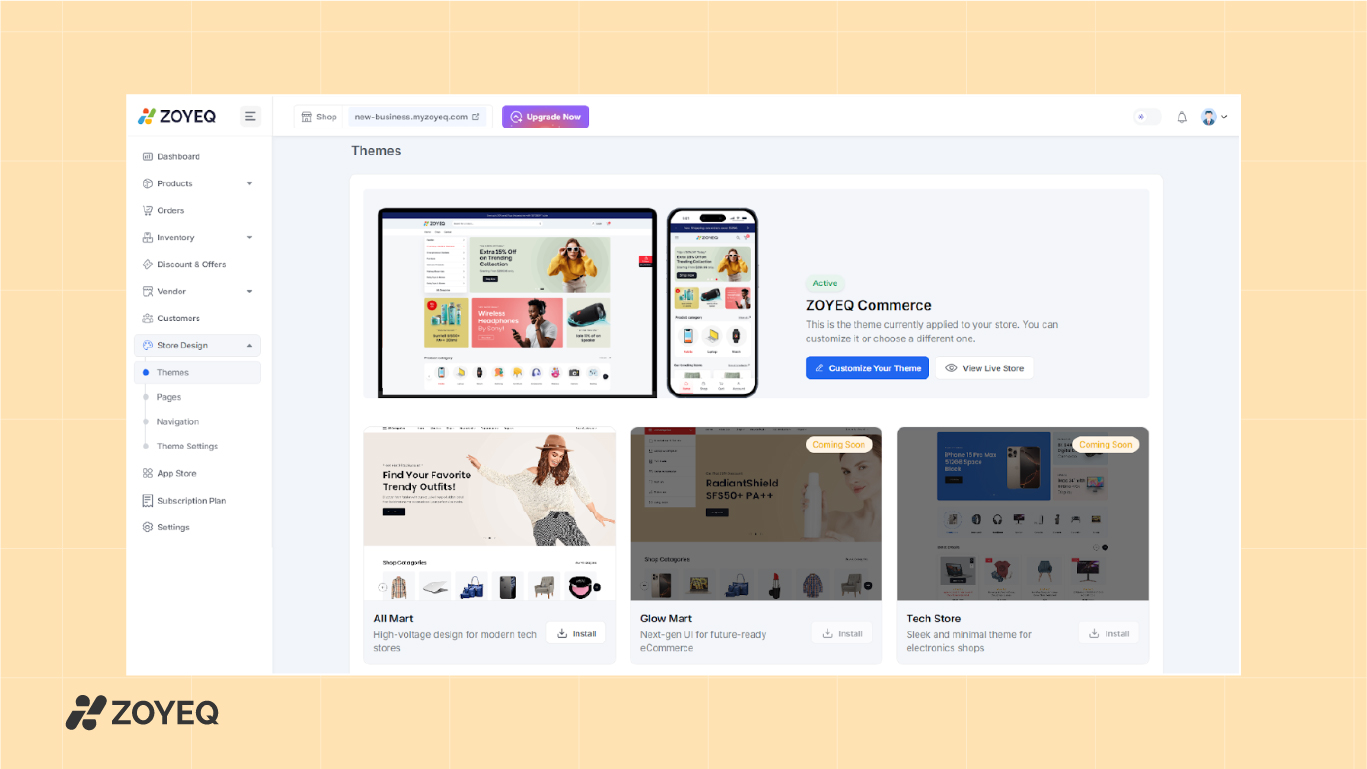
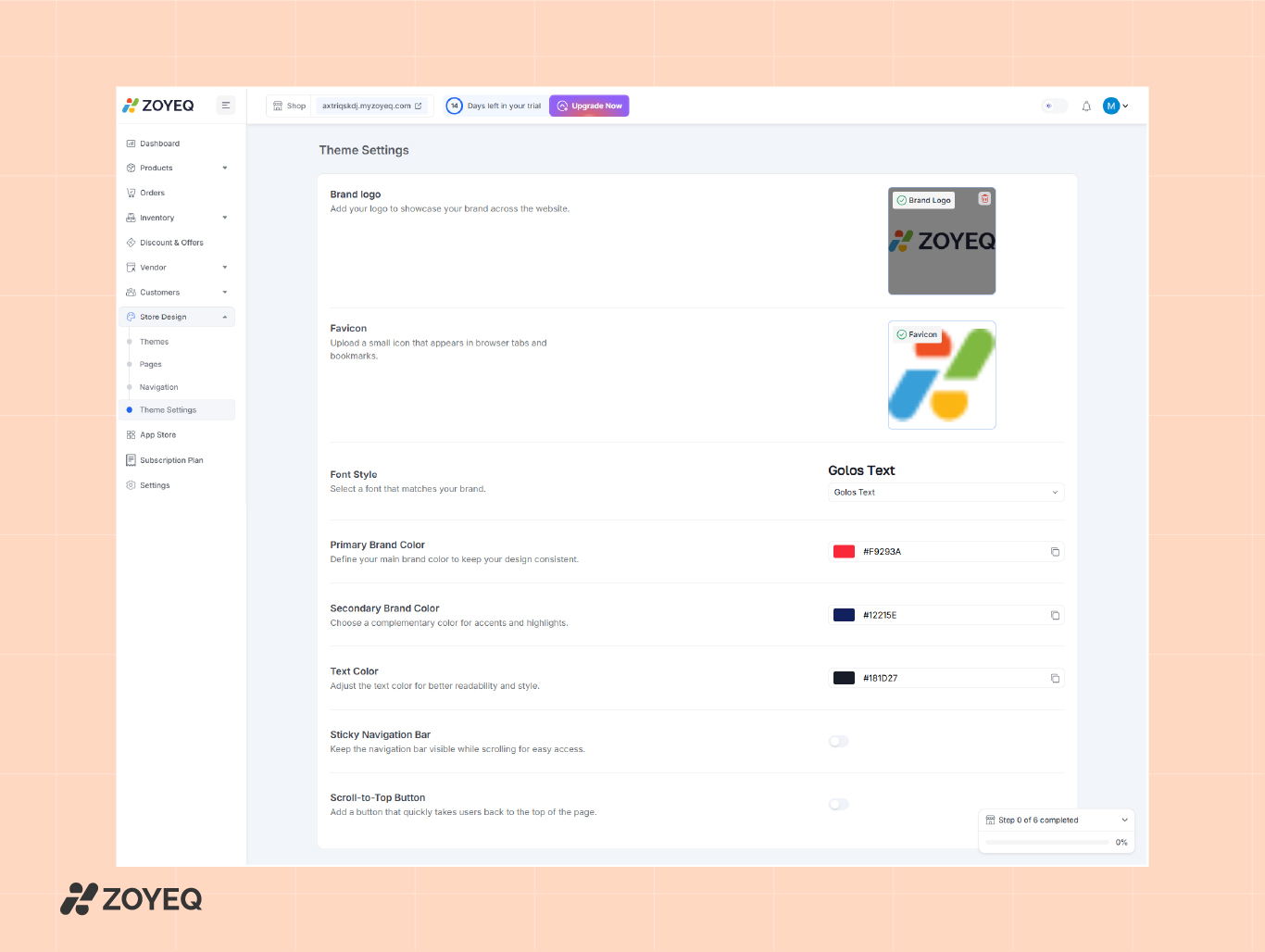
Click Customize Your Theme to adjust your store's look. In Store Design > Theme Settings , you can upload your logo, set a favicon, pick fonts, choose brand colors, adjust text color, and enable features like a sticky navigation bar or scroll-to-top button for easier browsing.
Brand settings
Upload your logo, favicon, and set your brand colors. You can also pick a font style that matches your identity. Small details like sticky navigation and a scroll-to-top button help improve user experience.
Pages
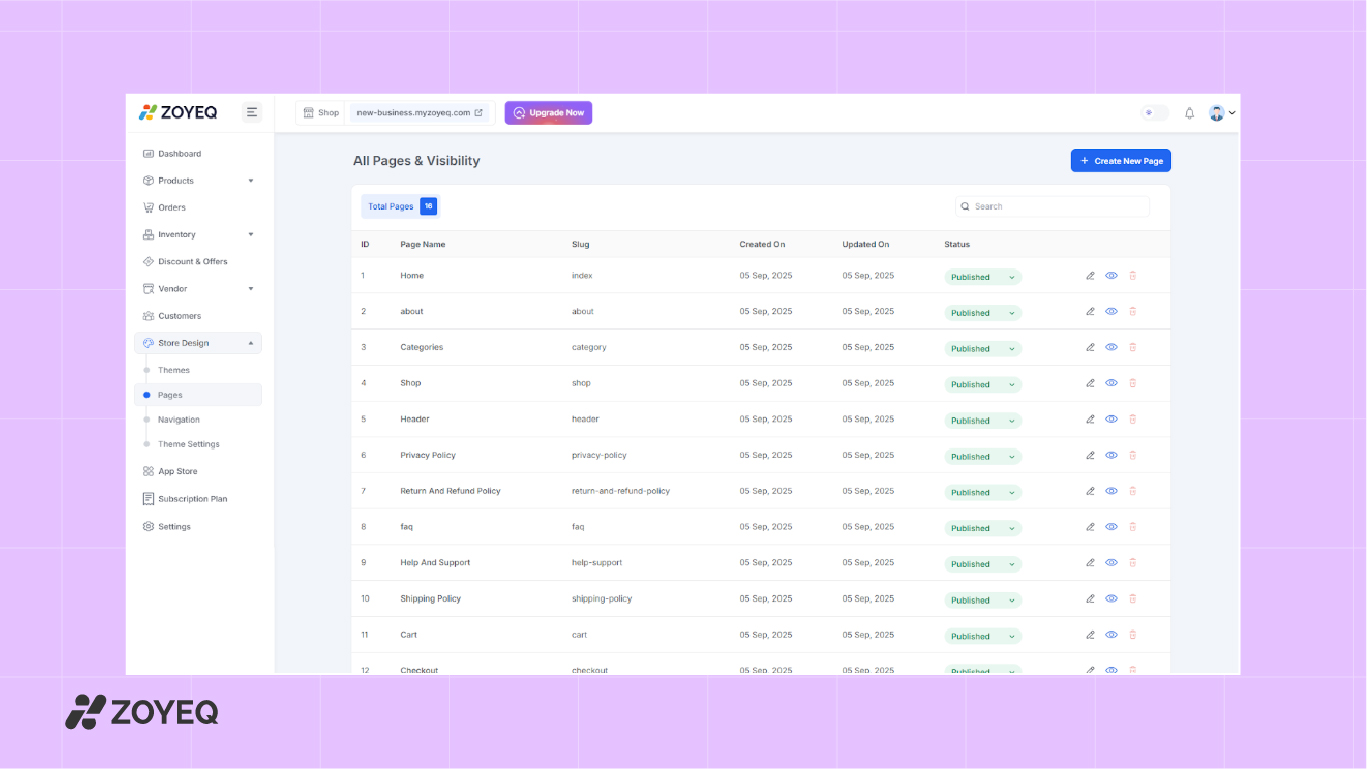
ZOYEQ automatically creates essential pages, including Home, Shop, Checkout, Cart, About Us, FAQ, Privacy Policy, and Contact. To view or update these, go to Store Design > Pages . You can publish/unpublish pages or create custom ones as needed.
Navigation
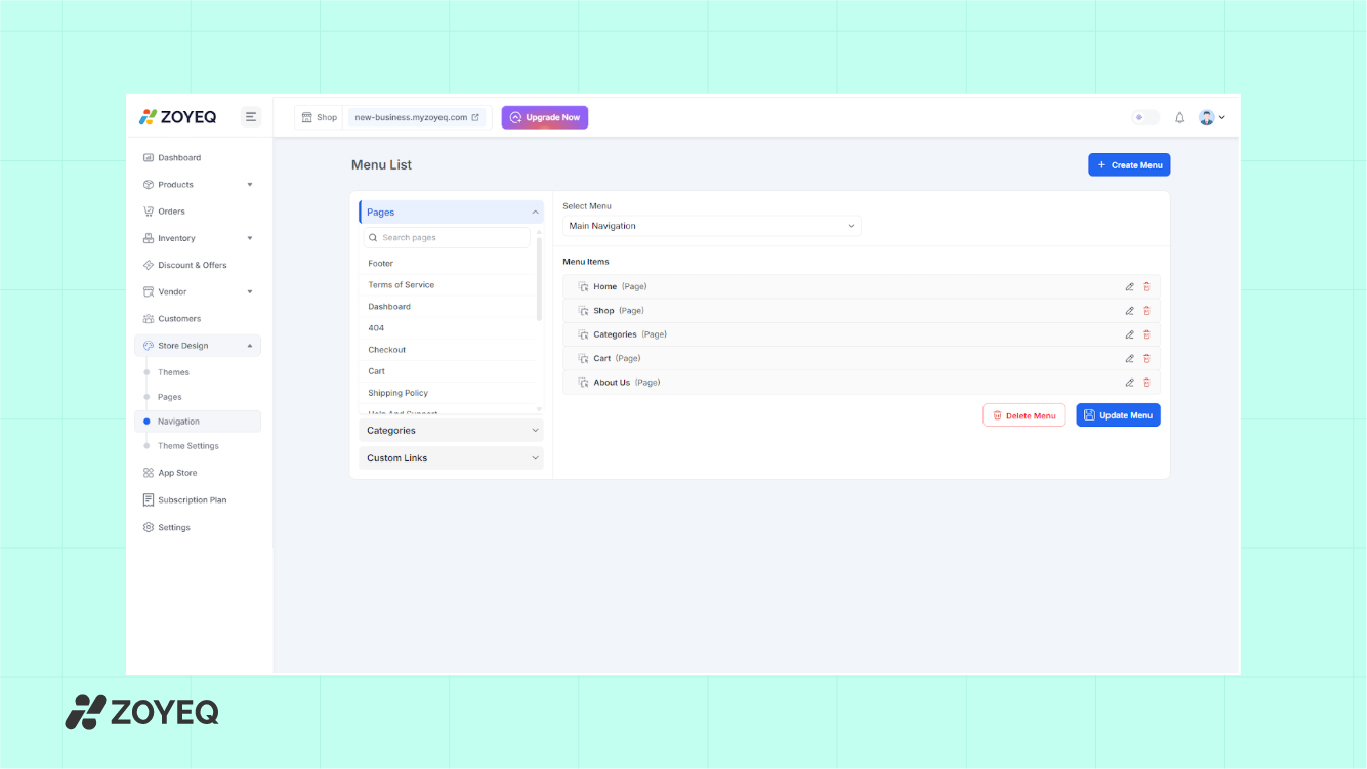
Go to Store Design > Navigation to create or edit your store's menu. You can choose which pages appear in the main navigation (like Home, Shop, Cart, About Us) and rearrange them with drag-and-drop. You can also add links to product categories or external pages.
Configure payments & shipping
Before you start selling, you need to set up how customers will pay and how their orders will be delivered. This step covers three areas:
- Shipping
- Payments
- Checkout method
1. Shipping options and delivery
Go to the Shipping & Delivery settings to manage how your products reach customers. You can choose between:
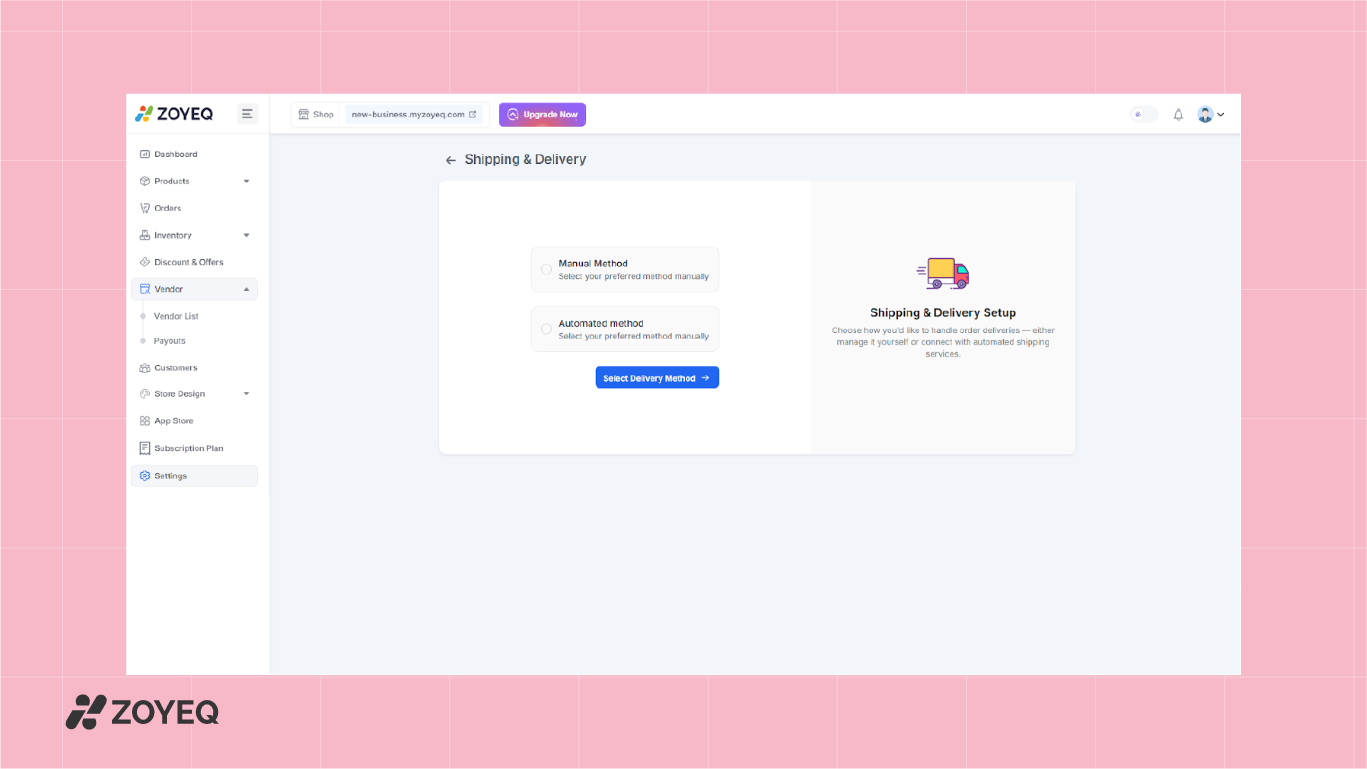
- Manual method: Add delivery zones manually. For example, you can define "Local Zone" or "Rural Zone" with custom prices and delivery times (e.g., 3–5 days).
- Automated method: Integrate with external shipping services for real-time rates and tracking.
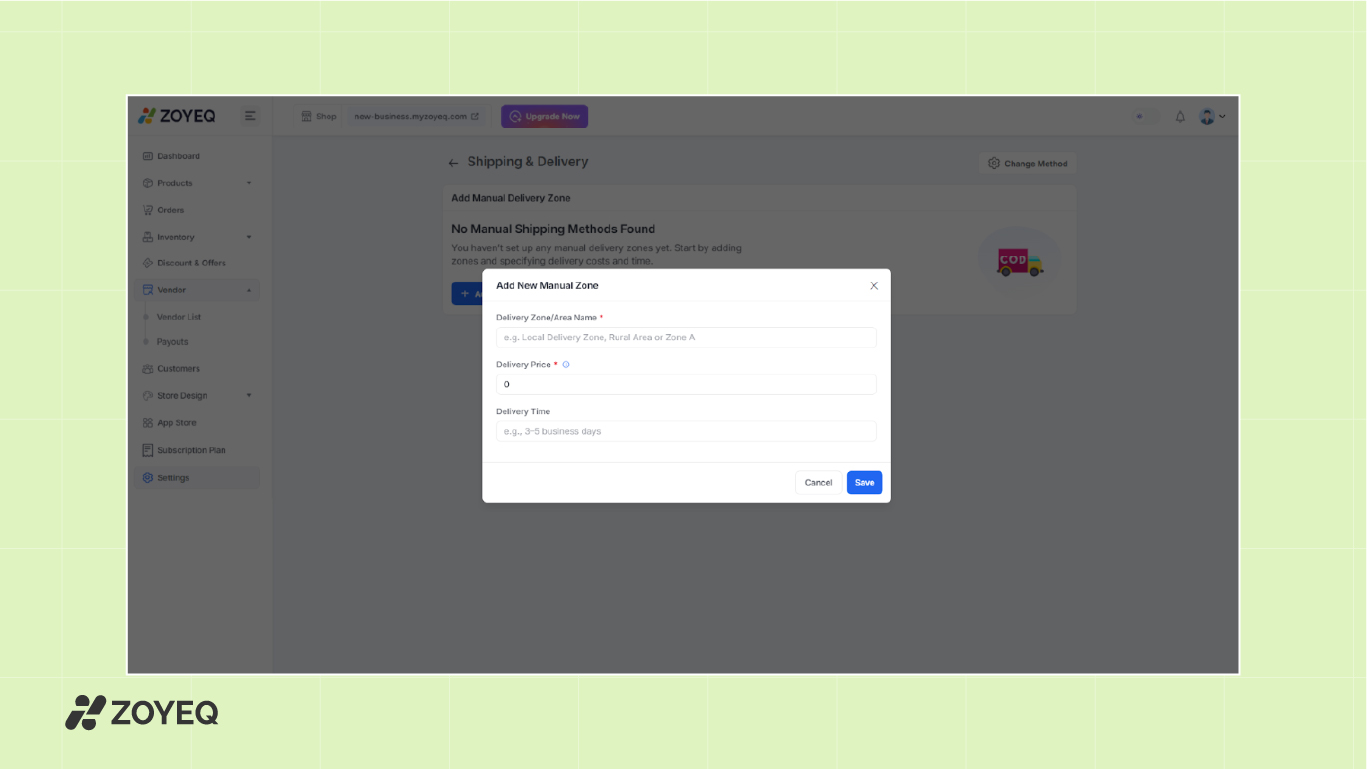
This flexibility helps you offer free shipping, flat rates, or location-based pricing. You can create multiple zones for different locations with different rates and timelines.
2. Add payment methods
In the Payment Methods section, you can connect gateways like Stripe , PayPal , and SSLCommerz (with more options coming soon). For local businesses, mobile payments such as bKash are also supported.
- Simply click Connect Payment Method , choose your gateway, and follow the setup instructions.
- You can also enable Cash on Delivery (COD) if you want customers to pay when they receive the product.
Test everything before launch
Before inviting customers to your store, it's important to make sure everything works as expected. This step ensures you've tested key features and are ready to go live with confidence.
Here's how to do it.
1. Preview the Store as a Customer
Start by viewing your storefront from a customer's perspective:
- Go to the top menu and click "View Live Store".
- Check the layout, menu, product listings, and category filters.
- Make sure pages like Home, Shop, Cart, and About Us are visible and functional.
2. Place a test order
This is one of the most important checks. Walk through the whole buying experience:
- Add a product to your cart.
- Go to the Checkout page.
- Choose a shipping method and payment option (you can use Cash on Delivery for testing).
- Submit the order.
3. Test the shopping experience
- Mobile and desktop views – Browse your store on different devices to check if the design looks clean and loads fast.
- Navigation flow – Move from Home to Shop to Cart to Checkout. Make sure everything is easy to follow.
4. Test store functions
- Coupons and discounts – Apply a test coupon to confirm the discount works.
- Shipping zones – Try addresses from different regions to see if the correct shipping price shows.
- Stock updates – Buy a test product and confirm that inventory levels update automatically.
Launch and promote your online store
Your store is set up, tested, and ready. Now it's time to bring in customers. A strong launch not only helps you get your first sales but also sets the tone for your brand. Here's how to launch an online store and promote it effectively.
Announce your launch
Start by telling people where they already follow you:
- Share on social media with engaging posts or short videos.
- Send an email announcement to your contacts or newsletter list.
- Post in community groups or forums related to your niche.
Keep your message simple: your store is live, here's what you sell, and here's how people can buy.
Run a launch promotion
A special offer can help you convert first-time visitors into paying customers. Ideas include:
- Limited-time discount (for example, 10–20% off first orders).
- Free shipping for launch week.
- A bonus gift with the first 50 purchases.
Build trust and social proof
Early customers can help you establish credibility. Ask for reviews, testimonials, or user-generated content such as photos or videos of them using your products. Share these on your website and social platforms.
Leverage marketing channels
Even with a small budget, you can spread the word effectively:
- Email marketing – Use tools like MailPoet or Mailchimp to send updates and offers.
- Influencer collaborations – Partner with niche creators who can showcase your products.
- User-generated content (UGC) – Encourage customers to share their purchases with a hashtag.
Launching is about creating excitement. Treat it like an event rather than just flipping a switch.
Grow with marketing, SEO, and analytics
Launching your store is just the beginning. The next step is to attract the right people, turn visitors into buyers, and encourage repeat purchases.
Basics of SEO for eCommerce
Search Engine Optimization (SEO) helps your store appear in search results when people look for products like yours.
Here's where to start:
- Optimize product titles and descriptions with keywords your customers search for.
- Add alt text to product images so they rank in image search.
- Use clean URLs like yourstore.com/product-name instead of long, messy links.
- Create category pages with clear headings to help both users and search engines.
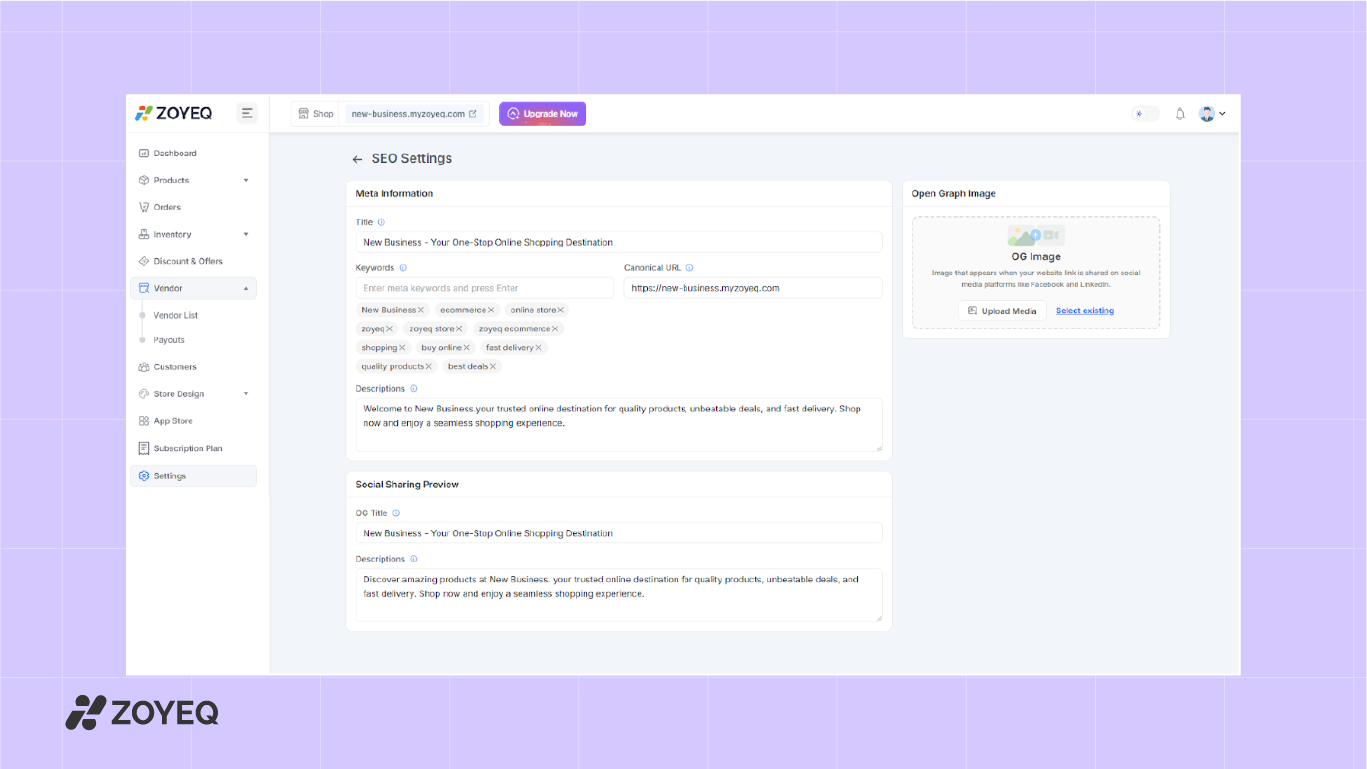
ZOYEQ also includes built-in SEO settings, so you can edit metadata and improve visibility without extra plugins.
Use analytics to track performance
Connect your store with Google Analytics 4 and Google Search Console to track performance. These tools reveal which products get the most views, how customers discover your site, and where they drop off during checkout. With this data, you can spot what's working and improve areas that aren't.
Run paid campaigns
Organic traffic takes time, but paid ads can bring faster results. You can run campaigns on Facebook and Instagram to target shoppers by interests and demographics, use Google Shopping Ads to show products with images and pricing in search results, or try Pinterest Ads for niches like fashion, beauty, home, and lifestyle.
Use ZOYEQ's built-in marketing tools (SEO Settings)
ZOYEQ includes a set of tools that help you run basic marketing right from your dashboard:
- Coupons & Discounts: Create limited-time offers or seasonal deals
- SEO Settings: Add meta titles, tags, and descriptions to all pages and products
- Email Marketing (Coming Soon): Send welcome emails, order follow-ups, and special promotions
Why Start an Online Store in 2025?
eCommerce keeps growing every year, and 2025 brings even more opportunities for new store owners. More people are doing online shopping than ever before, and the tools available make it easier to launch and grow a business.
Here are a few reasons why 2025 is the right time to start:
- Shoppers prefer online first: From groceries to gadgets, customers expect to find and buy products online. Having a store helps you meet them where they already are.
- Massive Market Opportunity: In 2025, retail e-commerce sales are estimated to exceed 4.3 trillion US dollars worldwide, according to Statista . From niche products to global brands, the demand is higher than ever, and there's still room for new players.
- Mobile shopping is stronger than ever: Most online purchases now happen on mobile devices. Platforms like ZOYEQ are built with a mobile-first design, so your store is ready from day one.
- AI tools save time: Product descriptions, SEO tags, and even ad copy can now be generated with AI. This lowers the barrier for new business owners.
- Global reach: Selling online lets you expand beyond your local area. With multi-currency and international shipping, even small businesses can reach worldwide audiences.
- Low startup costs: Unlike a physical shop, you don't need a heavy investment. A simple setup with the right platform can cost less than $100 to start. With tools like ZOYEQ, you can launch a professional online store with minimal investment.
- Flexible Work & Income: An online store gives you the freedom to work from anywhere, sell 24/7, and build multiple income streams, whether you sell physical products, digital downloads, or dropship items.
Why choose ZOYEQ as your eCommerce platform in 2025
Choosing the right eCommerce solution makes a big difference in how smoothly your store runs and how easily it can grow. ZOYEQ is designed for modern online businesses, offering the flexibility and simplicity store owners need.
Built for today's ecommerce needs
- Quick setup: Get your store live in minutes with guided onboarding.
- Mobile-first design: Every store looks and works great on phones, where most shoppers browse and buy.
- AI-powered tools: Instantly generate product descriptions, SEO tags, and even landing pages with ZOYEQ AI.
- Performance ready: Fast checkout, clean design, and no plugin overload to slow you down.
- Built-in analytics: Track key metrics like orders, revenue, top products, categories, and customer behavior. This gives you a clear view of your store's performance in one place.
Features that give you an edge
- Manage products, orders, customers, and vendors from one dashboard.
- Built-in marketing tools like discounts, coupons, and automated campaigns.
- Multi-vendor support if you want to grow into a marketplace.
- Seamless integrations with leading payment gateways, shipping providers, and third-party tools.
If you want an affordable eCommerce option built for beginners and growing businesses, the ZOYEQ eCommerce platform is a strong option, especially for those looking for an easy-to-use platform.
🚀 Start Your Online Store with a 7-Day Free Trial
ZOYEQ makes it easy to launch your eCommerce business in 2025. Get started with a 7-day free trial — no credit card required. Build, sell, and grow—all in one platform.
Get Started NowZOYEQ vs WooCommerce vs Shopify
| Feature | ZOYEQ | WooCommerce | Shopify |
|---|---|---|---|
| Setup Time | Minutes (AI-assisted) | Hours (manual setup, plugins) | Moderate (wizard setup) |
| Speed & Performance | Lightweight, fast checkout | Depends on hosting | Fast, but adds bloat |
| Mobile Optimization | Fully responsive, 2025-ready | Theme-dependent | Good, but limited control |
| AI Assistance | Built-in product + landing page AI | No native AI | Limited, 3rd-party apps |
| Built-in Analytics | Yes | Add-ons required | Yes (basic) |
| Customization Flexibility | High – Visual + Code | Very High (developer-friendly) | Limited unless on Plus |
| Payment Gateway Setup | One-click integration (SSLCommerz, PayPal, Stripe) | Plugin setup required | Built-in, but region-dependent |
| Multi-Vendor Support | Native | Plugin-based | Limited (3rd-party apps only) |
| Pricing Model | Free with upgrade plans | Free core + paid extensions | Monthly fees + % of revenue |
Common mistakes to avoid when starting an online store
Many new store owners rush through setup and end up facing issues later. Avoiding these mistakes will save you time and help you build a stronger business from the start.
- Poor product images: Blurry or low-quality images make customers doubt the product. Use clear, high-resolution photos with multiple angles.
- Neglecting SEO: If you don't optimize product titles, descriptions, and images, your store won't show up in search results. Basic SEO is essential for long-term traffic.
- Complicated checkout process: Extra steps, hidden fees, or required sign-ups often lead to abandoned carts. Keep checkout fast and straightforward.
- Ignoring mobile users: Most shoppers browse and buy from their phones. If your site doesn't work well on mobile, you'll lose sales.
- Skipping customer support setup: Not having clear contact options, FAQs, or chat support can frustrate buyers. Good support builds trust and encourages repeat purchases.
- Launching without testing: Failing to test payments, shipping, and order confirmation emails can create a poor first impression. Always test your store before going live.
Frequently asked questions (FAQ)
How much does it cost to set up an online store?
The cost varies depending on the platform and features. Basic setups can start as low as $100, while advanced stores may cost several thousand dollars. With ZOYEQ, you only pay a simple subscription fee without hidden costs.
Do I need coding skills to use ZOYEQ?
No. ZOYEQ is built for business owners who want a click-based setup. You can design your store, add products, and manage orders without touching code.
Is ZOYEQ beginner-friendly?
Absolutely. The setup process is guided, and you can launch your store in minutes. Even if it's your first time creating an online store, you'll find the dashboard simple to use.
Can I grow into a multi-vendor marketplace later?
Yes. ZOYEQ supports vendor and multi-vendor management, so you can expand as your business grows.
How do I handle customer support?
You can integrate tools like Zendesk or use live chat and chatbots. With ZOYEQ, you can also manage customer inquiries directly in your dashboard. Always respond quickly to build trust.
How do I scale my online store?
Focus on keeping customers, expanding your product range, and investing in advanced marketing. With ZOYEQ, you can also move into multi-vendor management to grow into a marketplace.
Can I start an online store with no money?
Yes, it's possible to start with little to no money using dropshipping or print-on-demand models. However, you'll still need a small budget for a domain and basic tools.
How long does it take to start making money with an online store?
It depends on your niche, marketing efforts, and product demand. Some stores see sales within weeks, while others may take a few months to build traction.
How can I create an online store without inventory?
You can use dropshipping or print-on-demand. These models let suppliers handle stock and shipping, so you don't need to keep inventory.
Do I need a business license to sell online?
This depends on your country and the type of products you sell. Some places allow you to start as a sole proprietor without a license, while others require registration. Always check your local laws before launching.
Ready to build your online business?
This was all about how to start an online store and sell products.
Creating an online store in 2025 is more accessible than ever. You don't need to be a developer or spend thousands of dollars to get started. With the right platform, you can launch quickly, customize your store, and focus on what matters most—selling your products.
The most important step is to begin. Many people delay because they're waiting for the "perfect" idea or design, but growth comes from launching, testing, and improving along the way.
With ZOYEQ, you can simplify the technical side and focus on building a store that attracts customers and grows sustainably. Whether you're starting small with digital products or planning a full-scale eCommerce business, the tools are ready for you.
Even if you want to build an online store from scratch, ZOYEQ makes it simple with pre-built themes and drag-and-drop design tools.
If you've been thinking about building your online store, now is the time to start.